 |
Double-click on the Outlook Express
icon on the desktop to start the program. |
 |
Go to the Edit menu and select Preferences... |
 |
In the Accounts/E-mail
category:
- Full name: Your name in Title Case
- E-mail Address: Your Olypen Internet e-mail address in small letters
(NO CAPITALS)
- SMTP server: smtp.olypen.com
- Account ID: Your Olypen Internet username in small letters (NO
CAPITALS)
- POP server: pop3.olypen.com
|
 |
In the Accounts/News
category:
- Server name: Olypen or Olypen Internet
- Server address: news.olypen.com
- Authentication: NOT CHECKED
|
 |
|
 |
|
 |
|
 |
|
 |
|
 |
|
 |
|
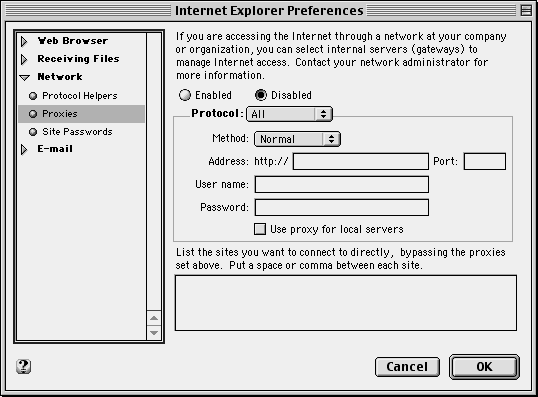 |
Be sure to disable all proxies by selecting "Disabled". |
 |
|




