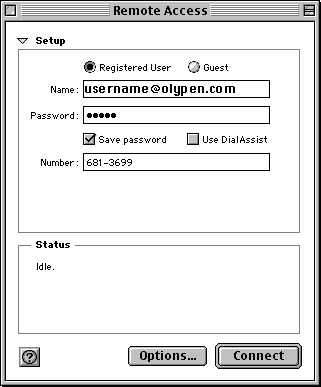
| Registered User: Selected.
Name: Enter your Olypen Internet username e.g: "username"
(The username to dial in on is the same as the first part of
your OlyPen email address)
Password: Enter your OlyPen Internet password. Save password: Checked.
Use DialAssist: Not checked.
Please choose the dial-up number closest to
your location:
681-3369 for Sequim / Port Angeles
(56k/ISDN)
379-3650 for Port Townsend
(56k/ISDN)
374-9747 for Forks (56k/ISDN)
Click on Options... to
change the properties of the PPP connection. |