Home > Support > Mac OS > TCP / IP Settings


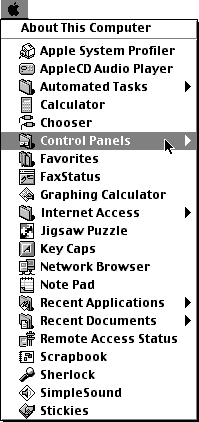
mnu_cp.gif (6405 bytes) Go to the Apple menu and select Control Panels
mnu_tcp.gif (5688 bytes) Inside Control Panels, select TCP/IP
cpl_tcp.gif (4667 bytes) Connect via: PPP.

Configure: Using PPP Server.

Name server add.:

  • Primary DNS = 208.200.248.1
  • Secondary DNS = 208.200.248.8

Search domains: olypen.com

KNOWN PROBLEM:

Sometimes the Name server addr and Search domains sections "disappear".

This is because the HD:System Folder:Preferences:TCP/IP Preferences file is corrupt.

Closing the TCP/IP Control Panel, Trashing this file (loses ALL TCP/IP settings) and reopening the TCP/IP Control Panel fixes the problem.


All Content © 2003 OlyPen