Home > Support > Windows > CuteFTP 2.0


ico_cft.gif (390 bytes) Run CuteFTP through the Start menu, or by double-clicking on the CuteFTP icon on the Windows Desktop.
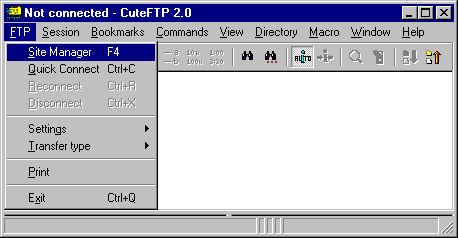
mnu_mgr.gif (5248 bytes) By default, CuteFTP will open the FTP Site Manager dialog as soon as it is started.

If this dialog does not appear, go to the FTP menu and select the Site Manager option.

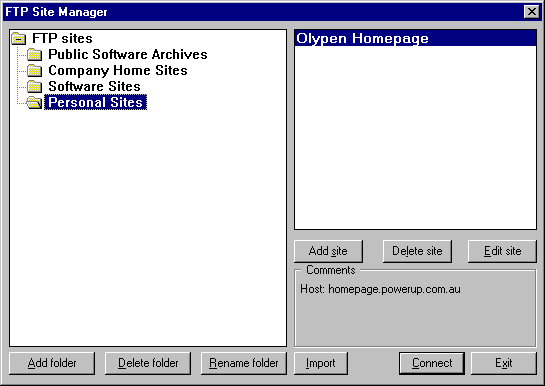
sitemgr.gif (6799 bytes) On the FTP Site Manager dialog:

If you don't already have a OlyPen Homepage entry, click on the Add site button, otherwise click on the Edit site button.

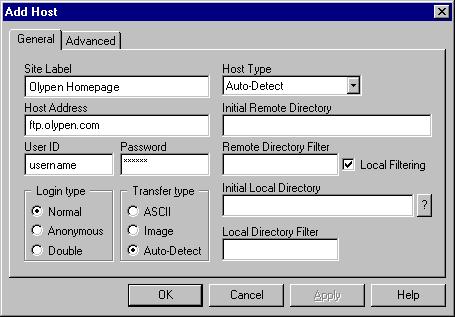
add_gen.gif (6622 bytes) On the General tab, use the following settings:

Site Label: Anything you wish.

Host Address: Must be ftp.olypen.com.

User ID: This is your OlyPen dial-up username.

Password: This is your OlyPen dial-up password.

 

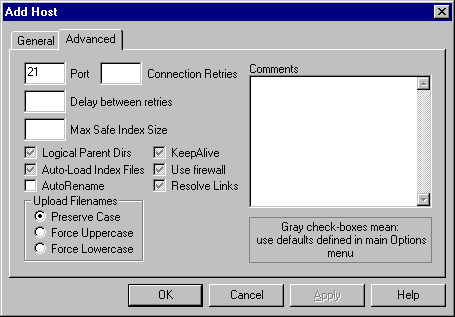
add_adv.gif (6757 bytes) The Default settings on the Advanced tab are usually OK.


All Content © 2003 OlyPen