Home
>
Support
>
Windows 3.1
>
Dialing Up (Win3.1)
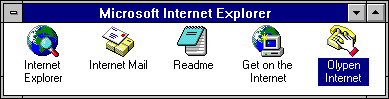
In the
Program Manager
, go to the
Microsoft Internet Explorer
group and double-click on the
OlyPen
icon.
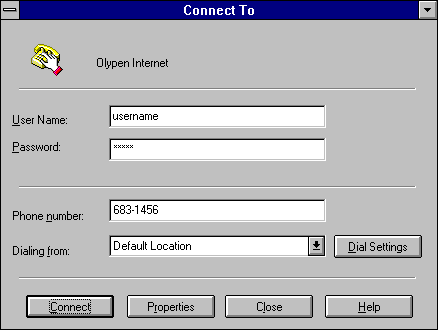
On the
Connect To
dialog:
User Name:
Pen e-mail address:
"username"
This is case-sensitive and must be in small letters (NO CAPITALS).
Password:
Your OlyPen password. This is case-sensitive and must be in small letters (NO CAPITALS).
Click on
D
ial Settings
to change the Area Code and Country location for your computer.
Click on the
P
r
operties
button to change the dialing number and TCP/IP properties
Click on the
C
l
ose
button to cancel the connection and return to the Program Manager
Click on the
C
onnect
button to start the dialing-up process.
Windows will start dialing...
... and hopefully will start verifying your username and password.
If all has gone well, the window will minimize to a "Connected to OlyPen" icon on the windows desktop.
Double-clicking on the icon will tell you your IP address and what speed you have connected at.
You can click on the
Disconnect
button to hang-up your connection.
All Content © 2003 OlyPen