Home > Support > Windows > Dial-up Networking 1.3


my_comp1.gif (1289 bytes) Double-click on the My Computer icon.
ico_dun.gif (592 bytes) Double-click on the Dial-Up Networking folder.
click.gif (2818 bytes) Right-click on the OlyPen icon and select Properties.
general.gif (6863 bytes) On the General tab:

Area code: Don't use.

Telephone number:

Please choose the dial-up number closest to your location:

  • 681-3369 for Sequim / Port Angeles (56k/ISDN)
  • 379-3650 for Port Townsend (56k/ISDN)
  • 374-9747 for Forks (56k/ISDN)

    Country code: United States (1)

    Use area code and Dialing Properties: unchecked.

    Connect using: Select the CORRECT modem driver.

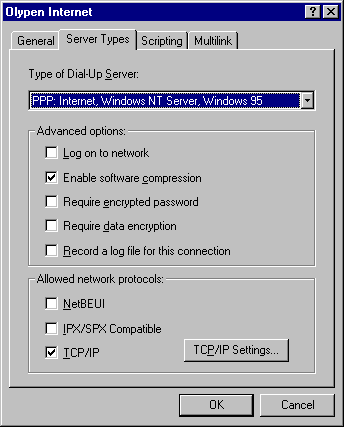
  • svrtype.gif (6213 bytes) On the Sever Types tab:

    Type of Dial-Up Server: PPP.

    Enable software compression: Checked.

    TCP/IP: Checked.

    (No other check boxes should have checks!)

    Then, click on the TCP/IP Settings... button.

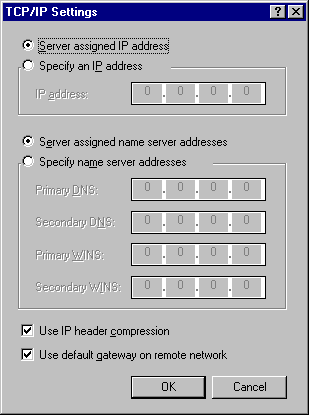
    tcpip.gif (6576 bytes) On the TCP/IP Settings dialog:

    Server assigned IP address: Selected.

    Server assigned name server addresses: Selected.

    Use IP header compression: Checked.

    Use default gateway on remote network: Checked.

    **Note**: Some dial-up connections will not work with "Server assigned name server addresses" selected. In these cases, use the following settings:

    Specify name server addresses: Selected.

    Primary DNS: 208.200.248.1

    Secondary DNS: 208.200.248.8

    Primary WINS: 0.0.0.0

    Secondary WINS: 0.0.0.0

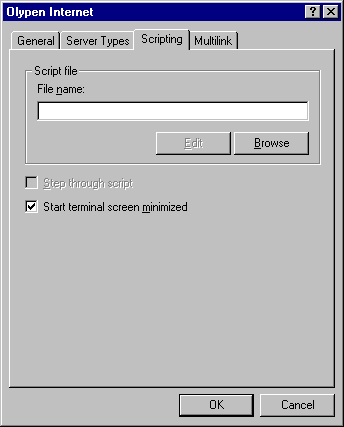
    scriptn.gif (4394 bytes) On the Scripting tab:

    File name: (Completely empty!)

    Start terminal screen minimized: Checked.

    mlink.gif (4858 bytes) On the Multilink tab:

    Do not use additional devices: Selected.


    All Content © 2003 OlyPen